Migrate from Microsoft 365 to MailSprout
Your old emails come with you. This guide walks you through copying every message from your Microsoft 365 / Outlook mailbox to MailSprout, then flipping your domain's MX records so new mail flows here. About 30 minutes per account, most of which is sit-and-wait while imapsync runs.
Create the destination account in MailSprout
In your MailSprout dashboard, open the relevant domain and click Add account. Type the same name (the bit before the @) you have in Microsoft 365. If your old address was you@yourdomain.com, type you. Go to the account page in your MailSprout dashboard. In the Bring over old emailsection, you'll find the destination server credentials you need.
MailSprout will generate a strong password and show it to you once. Save it; you'll need it in Step 3.
Enable IMAP and create an App Password
Microsoft 365 disables IMAP for most tenants by default and modern security blocks normal password login from third-party tools. You need to do two things:
- Enable IMAP on the mailbox.
- Personal accounts (outlook.com, hotmail.com, live.com): IMAP is on by default. Skip this part.
- Business tenants: an admin signs in to admin.microsoft.com (opens in a new tab) → Users → pick the user → Mail tab → Manage email apps → tick IMAP.
- Create an app password.
- Sign in to mysignins.microsoft.com/security-info (opens in a new tab) with the mailbox you're migrating.
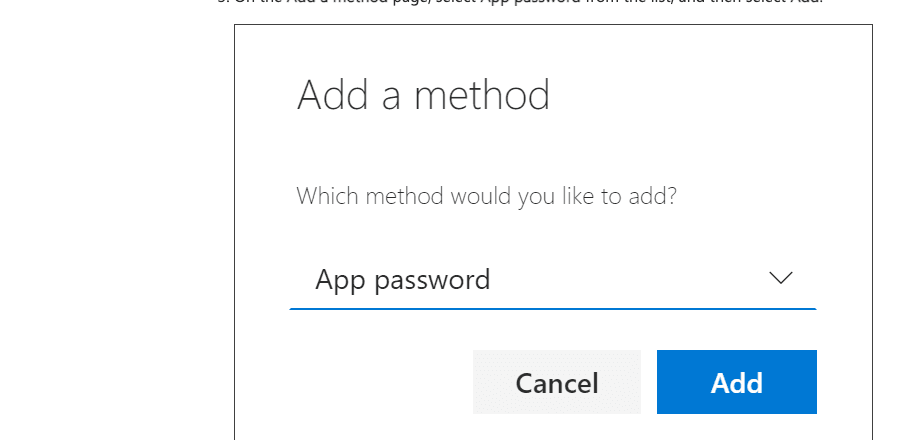
- Click Add sign-in method → App password.
- Name it
MailSprout migration, copy the 16-character password (it shows only once).
Run the migration with imapsync
Go to the imapsync free web app: imapsync.lamiral.info/X/ (opens in a new tab). Fill in your credentials and click Start.
Fill in the form with two sets of credentials:
Source (Microsoft 365)
- Host:
outlook.office365.com - Port:
993(SSL) - User: your full Microsoft 365 email
- Password: the App Password from Step 2
Destination (MailSprout)
- Host:
fusion.mxrouting.net - Port:
993(SSL) - User: the same email address
- Password: the MailSprout password from Step 1
Click Start. imapsync copies every folder, every message, every flag (read/unread, flagged, categories). For an average 10k-message inbox, plan on ~30 minutes. You can close the browser tab; the job runs server-side and emails you when it's done.
Verify the migration looks right
Set up your MailSprout account on a device (scan the QR code on the account page with your iPhone Camera). Open Apple Mail (or Outlook on the same device pointed at the MailSprout server) and confirm your old folders and messages are there.
Do this beforechanging MX records. If anything looks wrong, fix it now; there's no rush yet because Microsoft is still receiving your live mail.
Cut over MX records
Open your registrar's DNS panel and replace the Microsoft MX records with MailSprout's. Use one of our registrar tutorials:
Old Microsoft MX records look like yourdomain-com.mail.protection.outlook.com. Remove those; add MailSprout's fusion.mxrouting.net (priority 10) and fusion-relay.mxrouting.net (priority 20), plus the SPF, DKIM, and DMARC records from the MailSprout dashboard.
Run imapsync one more time
About an hour after the MX change, go back to imapsync and re-run with the same credentials. It only copies new messages (skips what's already on the destination), so this is fast.
Cancel Microsoft 365 (when you're sure)
Wait at least a week so you can re-run imapsync if a stray message lands at Microsoft. Then in the admin center: Billing → Your products → pick the subscription → Cancel subscription.
Troubleshooting
imapsync says authentication failed for the Microsoft account.
I see folders called "Archive", "Conversation History", etc. that I don't recognize.
Will Teams, OneDrive, SharePoint come with me?
I changed MX but new mail still arrives at Microsoft.
*.protection.outlook.com, the registrar hasn't propagated yet.Set up your domain first
The #1 registrar by market share. Most small businesses start here.
Popular among indie founders and developers.
Power-user favorite. DNS panel is the cleanest in the business.
Indie-hacker darling. Fast, cheap, fair pricing.
Includes former Google Domains customers who got migrated here.
Long-time favorite of founders and writers.
Stuck on a step?
Email support@mailsprout.io with the step number and a screenshot. We reply same day.